Core Concepts

Services
A service is a Docker Compose stack deployed on a server. DevPanel manages its full lifecycle: deploy, restart, stop, update, and delete.
Creating a service
- 1Open a project and click New Service.
- 2Enter a name and select the server to deploy to.
- 3Paste your Docker Compose YAML into the editor.
- 4Optionally add environment variables.
- 5Click Deploy.
Example Compose YAML
compose.yml
services:
  web:
    image: nginx:alpine
    ports:
      - "8080:80"
    volumes:
      - ./html:/usr/share/nginx/html:ro

  db:
    image: postgres:16-alpine
    environment:
      POSTGRES_PASSWORD: secret
    volumes:
      - db_data:/var/lib/postgresql/data

volumes:
  db_data:
Environment variables
Variables are stored securely and injected at deploy time. Add, edit, or remove them without redeploying — just redeploy afterward to apply changes.
Service tabs
Each service has the following tabs in its detail view:
| Tab | Contents |
|---|---|
| Overview | Status, port mapping, container resources (CPU, memory, network), service controls |
| Logs | Live streaming container logs |
| Deployments | Deployment history with timestamps |
| Domains | Attached custom domains and SSL status |
| Env | Environment variables (encrypted at rest) |
| Volumes | Mounted volumes and bind mounts |
| Resources | CPU, memory, and network usage charts |
| Source | Docker Compose YAML editor |
| Uptime | Uptime history and availability stats |
| Advanced | Container labels, restart policy, and other settings |
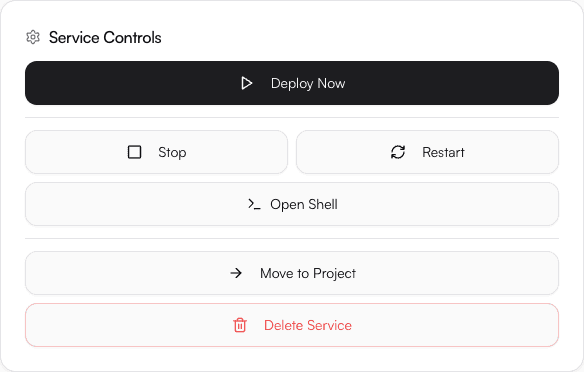
Service controls
| Action | Effect |
|---|---|
| Deploy Now | Runs docker compose up -d (pull latest + start) |
| Stop | Stops containers without removing them |
| Restart | Restarts all containers in the stack |
| Open Shell | Opens an interactive terminal inside the running container |
| Move to Project | Reassigns the service to a different project |
| Delete Service | Stops and removes containers and the service record |